

blog23 | 09 | 2026
The question is no longer which AI model to use. It is which one, for what, and at what cost.
Claude, Gemini, GPT and Grok reshaped marketing analytics in a matter of months. But picking «the best model» is the wrong question: none of them is best at everything.
One model reasons better through a complex analysis. Another reads images and video more accurately. Another costs a fraction for simple queries. And another has the freshest signal on what is happening on X. Committing to a single one means losing on everything else.
ADA starts from a different premise: it is not a model, it is the layer that picks the right model for each task, balancing depth, speed and credit consumption without you having to think about it.
This article has two halves. First, how that architecture works and why it matters. Then the practical part: the rule that saves you credits and seven concrete ways to get more out of ADA starting Monday.
The problem
For years, adding AI to marketing analysis meant plugging in an assistant tied to a single model. It was fine to get started. But the pace at which new models arrive left that approach behind.
Today ADA's model picker lists fourteen models from four providers (Anthropic, OpenAI, Google and xAI) side by side on the same screen. And the list keeps moving: while ADA Flash runs on Gemini 3.7 Flash, the catalog already offers 3.8. Every release brings something new: a larger context window, better image reading, more speed or lower cost.
The trouble with a single model is lock-in: when a better one shows up for your task, you are stuck until someone rebuilds the integration. You are always one version behind.
The best model of the month stops being the best the following month. Marrying one is betting the market will stop improving.
The architecture
ADA is multi-model, or model-agnostic. Put simply: several frontier models can run underneath the assistant, and ADA decides which one to use based on what you ask. It is not a chatbot wired to one LLM; it is the layer that orchestrates all of them.
Two terms worth separating, because they get confused constantly. Multi-model is this: several models available, one per task. Multimodal is something else: a single model's ability to understand text, image and video at once. ADA is multi-model and, on top of that, leans on multimodal models when the task calls for it, such as reading a creative.
That orchestration works in two ways:
In conversation mode, ADA presents its engines as named tiers, each backed by a different model:
…plus an open catalog of individual models for cases where you need maximum depth or the lowest possible cost.
The architecture changed with ADA 2.0 and brought three things you notice in daily use. Transparency: you can see what actions the assistant runs, what information it pulls and what context it builds the result from. Conversational memory: it remembers the previous exchange, so you do not have to repeat your instructions in every message. And smart widget updates: when you ask to adjust a chart, ADA keeps the procedure and the logic it originally used instead of starting over.
Behind every tier there is a criterion, not a whim. And when ADA works on its own, that criterion is applied automatically: choosing well is the part you never see, and it is exactly where the value sits.
The comparison
An important clarification: it is not that each model is useful for one thing only. They can all do almost everything. The difference is in how much they consume to get there and which task they handle best. Choosing well is, above all, a question of efficiency.
Credit cost gap
That is the gap between the cheapest model in the catalog and the most expensive, for the same question: from ×0.1 to ×3.3. Managing that margin is what ADA does: use the right model, not the priciest one by default.
| Engine · model | Best at | Relative consumption | When you pick it |
|---|---|---|---|
| ADA Flash · Gemini 3.7 Flash | High volume and low complexity: classifying comments, tagging, translating, summarizing. Also reading creatives: people, objects, colors, logos | ×0.5 | You are processing hundreds of simple, repetitive items |
| ADA Pro · GPT-5.6 Terra | Day-to-day marketing work: campaigns, copy, KPIs, competitor research | ×0.6 | Always. It is the starting point, not one option among many |
| ADA Max · Claude Sonnet 5 | Deep reasoning, complex instructions and long context: churn, GTM, attribution, pricing | ×0.7 | Redoing the work would cost you more than the analysis |
| ADA X · Grok 4.6 | Real-time signal and trends from X | variable | You are taking the pulse of the conversation on X |
| Catalog · GPT-5.6 Luna | The cheap end of the catalog: it consumes six times less than the default engine | ×0.1 | You value savings over depth |
| Catalog · Claude Opus 5 | A one-million-token context window: multi-source research and long documents | ×1.7 | The task does not fit in a normal conversation |
| Catalog · Claude Fable 5.1 | The opposite end: it consumes five and a half times what the default engine does | ×3.3 | You already tried Max and the task still asks for more |
Relative consumption is a ratio, not an exact credit value: it shows how much each model weighs against the others. Multipliers from ADA's model picker, September 2026.
The pattern is clear. To read what an ad shows (which people, objects, colors or logos appear), a model with strong multimodal capability like Gemini detects more and detects it better. For a simple, repeated query, an inexpensive model clears it for a fraction of the cost. And for analysis that leaves no room for error, Claude's ecosystem holds long reasoning better.
There is one case where efficiency wins by name: when analyzing X, it does not matter which model you are chatting with. ADA turns to Grok to gather the information, because that is the route that optimizes credits on that source.
The rule
If you take one thing away from this article, make it this: always start with ADA Pro. It is the default engine and it is built to cover most of a marketing team's daily work with the best quality-to-cost ratio. Move up a tier only when a specific task proves it needs to.
It sounds obvious. It is not: the natural reflex is to leave the most powerful model selected «just in case», and that is where credits disappear without anyone noticing.
The three moves, then:
And the open catalog comes after Max, not before. It is surgical use for specific cases, not a replacement for the normal path.
The point
The expensive mistake is not picking the cheap model. It is leaving the priciest one selected by default and not finding out until the end of the month. You can check how many credits you have used under Administration → My Plan.
The deliverables
Most teams use ADA as a search box with better manners: ask, read the answer, copy and paste. It is the poorest possible use. ADA 2.0 delivers in five different formats, and you name the format in the prompt.
The HTML report is the deliverable that changed the most, and not only in what it says: also in how it looks. That deserves its own section.
The design
There is a cost almost no team accounts for. The platform delivers a report that is correct but generic, and someone spends a couple of hours rebuilding it in Slides with the brand's identity before presenting it to the client. That work adds not a single conclusion to the analysis: it merely translates it into another format.
ADA now generates the report with the brand identity already applied. Design stopped being an afterthought and became one more parameter of the deliverable.
What you set before generating it:
If you would rather not decide every detail, ADA suggests. Below the canvas you get design shortcuts ready to apply one at a time: dark mode, gradient background, glass cards, parallax, bigger titles, rounder corners, softer colors. You try them, see the result and move on.
And when no option in the panel does exactly what you have in mind, you ask for it in words. Customization is conversational too: you describe the change on any element of the report and ADA applies it. It is the same assistant, working on the aesthetics instead of the data.
The fine print
If you choose a Google Font, every person who opens the report downloads it from Google on load. For the document to travel with the typeface inside it, upload your own from advanced settings and mark it as in use. That is the difference between a report that depends on a connection and one that does not.
Automatic replies
So far ADA works behind closed doors: you ask, it answers you. The feature that just shipped puts it out in the open, speaking in your brand's name. That is a different kind of leap: the community gets an answer while the conversation is still alive, and always in the same voice. What makes that work matters as much as the answer itself: ADA knows when it is not its turn to speak.
The problem it solves is familiar to anyone who runs a community. A post that lands pulls in hundreds of comments within hours, and answering one by one does not scale. The ones that arrive at night or over the weekend usually go unanswered, and the longer an answer takes, the less it is worth. And when four different people reply, the brand sounds like four different brands.
ADA reads every public comment on Facebook, Instagram, LinkedIn, TikTok, X and YouTube, Ads posts included, and before writing anything it asks itself three questions: who is this comment talking to, what is the post about, and what is it asking the brand for. Only then does it write, in the tone your team configured: personality, formality, form of address, emoji, length and language.
And then comes the part that really matters.
Confidence threshold
ADA scores how sure it is that its answer is correct, complete and aimed at the right person. Below that number it does not publish: the comment stays in Bunker for someone on the team to handle.
The real cases from testing show where each one lands. «Great article» earns a 95% and a short reply. A mixed comment (praise plus a criticism of the learning curve) reaches 84% and gets published addressing both halves. But «do you have a newsletter?» stops at 33%: ADA had drafted a reply confirming one exists, without having that information. And «the dashboards take forever to load» stops at 63%, because a technical complaint deserves a person.
One case sums up the logic better than any other: a glowing comment about Bunker's products scored 88% confidence, well above the threshold, and still was not published. The «Brand» topic was not enabled in the configuration. Rules outrank confidence, every time.
Because before the threshold there is an earlier filter, and it is yours: you define which networks ADA can reply on, which sentiments, which topics, and which ones explicitly not, on which days and in which time slots, with holidays and exceptions. Many brands keep negative comments in human hands at all times. And if you would rather move in stages, there is a «suggest only» mode: ADA drafts, someone on the team reviews and decides whether it goes out.
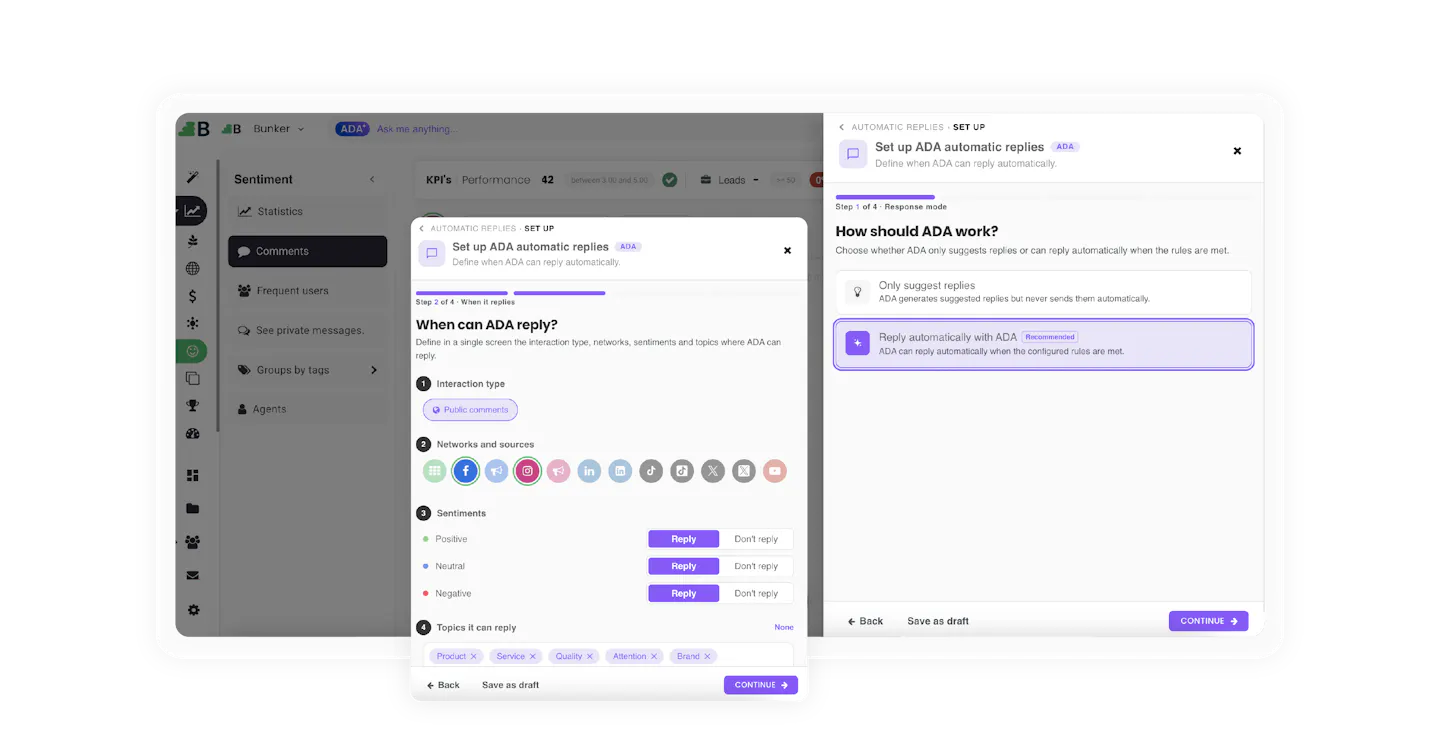
The limit, stated plainly
ADA does not answer prices, dates, stock or technical details it cannot confirm, does not step into conversations between users, and does not engage with topics outside the brand. And there is one concrete limitation: on X it cannot verify whether a comment was already answered by hand, so it could duplicate a reply the team already gave. We would rather it stay quiet than answer badly: every automatic reply is the brand speaking in public.
In practice
None of this is advanced. These are the things that separate a team that uses ADA from one that gets real leverage out of it.
Two operational notes to close. Data stays in memory for up to an hour, so if you come back to a conversation much later it is worth pulling it again. And consumption counts both what you ask and what ADA answers: a vague prompt that produces three pages of text costs more than a precise one that produces half a page.
The criterion
If every model can do almost everything, why not always use the most powerful one? For two reasons: cost and fit.
Asking an inexpensive model for a complex analysis can get expensive in a different way. A lightweight model, pushed past what it handles well, tends to hallucinate: it returns an answer that sounds convincing but is wrong. That is why, when the task is demanding, it is worth checking both where the data came from and how it was used.
At the other end, a top-capability model sharply reduces that risk on complex tasks and gives high-confidence answers for sensitive decisions. But using it for a trivial question is overpaying for nothing.
It is not about using the most powerful AI. It is about using the right one.
The nuance
No model is infallible and none replaces human judgment: AI speeds up and amplifies the team's thinking, it does not stand in for it. When a decision is sensitive, the answer gets reviewed. ADA's advantage is not promising absolute certainty, but putting the right model on each task and leaving the final call where it belongs: with your team.
ADA is Bunker's AI layer and it lives inside Bunker Analytics: first we centralize and normalize your marketing data, and on top of that base ADA turns your questions into analysis, charts and actionable reports. The multi-model architecture does the rest: the right model for each task, with credit consumption under control.
Choosing the model stopped being a technical decision and became a budget decision. The good news is you no longer have to make it by hand every time. Meet ADA AI and book a demo with your own data.
Lucas Suarez
Marketing Analyst
1/9


